Self-Hosted X Scheduler for n8n: Own Your Posting Workflow
A practical self-hosted X scheduler pattern for creators and builders who want a local content calendar, an n8n publishing workflow, and fewer recurring SaaS subscriptions.
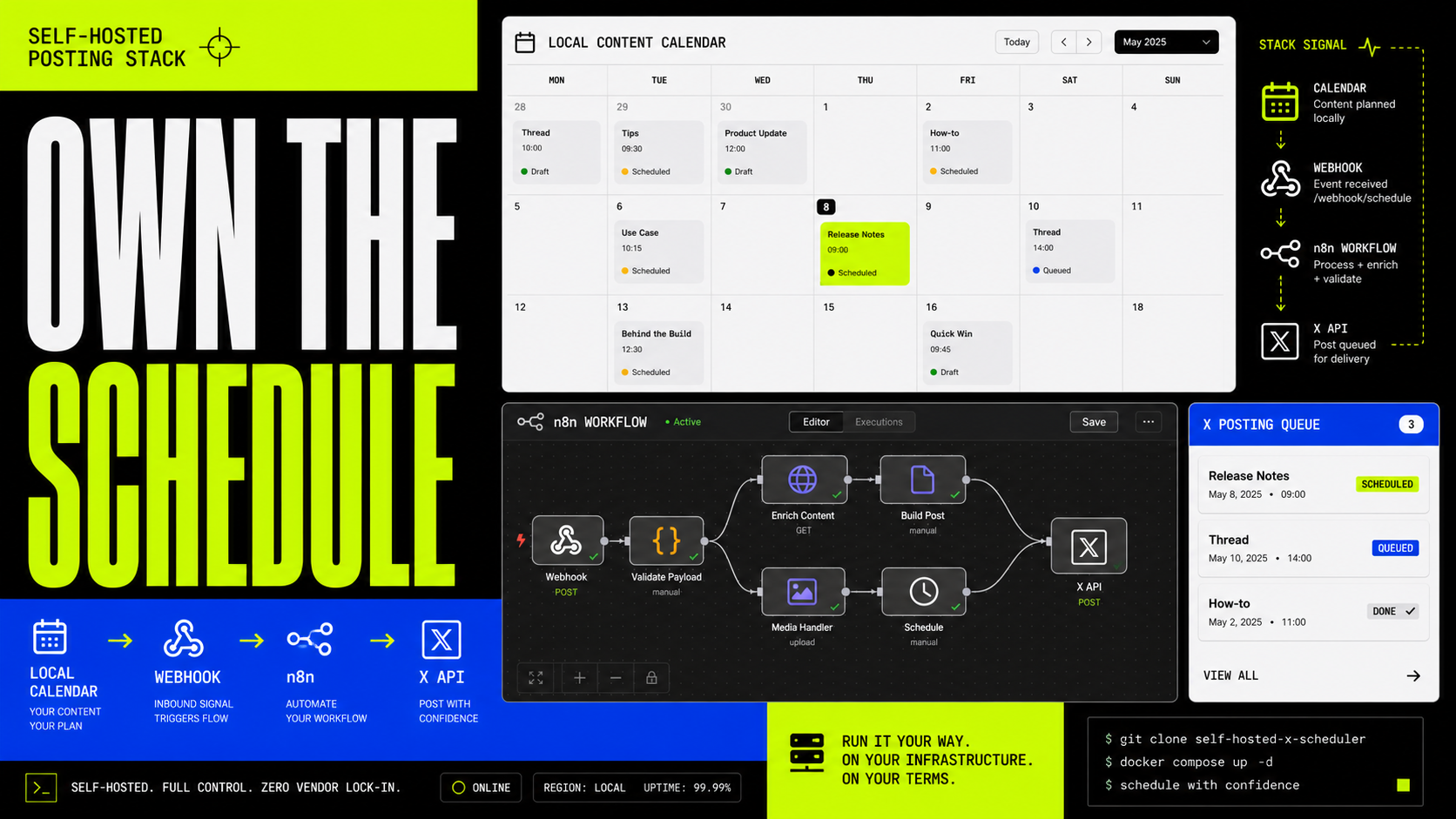
Most creators do not need another content scheduler subscription. They need a clear queue, a reliable posting mechanism, and enough ownership that the workflow does not turn into yet another black-box dashboard.
That is the point of a self-hosted X scheduler for n8n: keep the planning surface local, keep the publishing logic visible, and let your own X OAuth credentials do the posting.
It is not the right answer for everyone. If you want a fully hosted service that works while every device is closed, use a hosted scheduler. If you already run n8n, understand webhooks, and would rather own the moving parts, this is the cleaner operator-grade route.
The kit is available on Gumroad: Self-Hosted X Scheduler for n8n.
The problem with another scheduler subscription
Buffer, Typefully, Hootsuite, and similar tools are useful. They also turn a simple workflow into a recurring bill.
For a creator posting a few dozen times a month, that can feel absurd. The expensive part is not the compute. It is the convenience wrapper, team features, analytics surface, and hosted reliability.
If you need those things, pay for them. If you mainly need "publish this post at this time," a self-hosted kit can be enough.
The more interesting benefit is control. A local scheduler plus n8n workflow gives you a system you can inspect:
- The post queue lives in a browser calendar.
- The automation lives in your n8n instance.
- The X credentials stay in your own infrastructure.
- The webhook contract is visible.
- The failure modes are fixable because the workflow is not hidden.
How the workflow works
The simple version is:
- Import the n8n workflow.
- Connect X OAuth2 credentials in n8n.
- Open the local browser scheduler.
- Draft posts, threads, and media posts.
- Keep the scheduler tab open.
- When a post is due, the browser calls your n8n webhook.
- n8n publishes to X through the official API and returns the result.
The browser is the calendar and timer. n8n is the publisher. X is the final API.
That split is important. The kit is not pretending to be a cloud SaaS. It is a local content calendar wired to a self-hosted publishing workflow.
What the local calendar does
The local browser app is the working surface.
It lets you draft posts, pick dates and times, prepare threads, attach media, and track what has been queued or published. Because it runs locally, it is lightweight and easy to inspect. There is no hosted account layer just to hold your drafts.
This is useful for solo creators and technical operators who want a visible queue without turning the content calendar into a project management system.
The tradeoff is obvious: the browser tab matters. If the tab is closed or the machine is asleep, the local scheduler cannot fire the webhook.
That is not a bug. That is the cost of choosing a local-first workflow instead of a hosted scheduling service.
What the n8n workflow does
n8n handles the API side.
The workflow receives a webhook request from the local calendar, routes the request by type, prepares the payload, and calls X through OAuth2.
The current workflow shape supports the practical paths a creator expects:
- Text posts
- Threads
- Image and video media handling
- Post deletion
- Test requests to verify credentials
- Structured success and error responses back to the browser
Because this is n8n, the workflow is editable. You can add logging, notifications, client-specific branches, approval steps, or a different content source without waiting for a SaaS roadmap.
That is the real advantage: the scheduler is not just a product. It is a starting point for a publishing system.
The OAuth2 setup is the part to respect
The most technical part is not the calendar. It is X API access.
You need an X developer app and OAuth2 credentials connected in n8n. The workflow needs scopes that allow it to read the user, write posts, and upload media.
This is where self-hosted tools get honest. A hosted scheduler hides OAuth setup behind a login button. A self-hosted workflow asks you to wire the credentials yourself.
For the right user, that is a feature. Your tokens live in your n8n instance, not inside a third-party scheduler account you barely use.
For the wrong user, it is friction. If the phrase "OAuth2 callback URL" makes you want to walk into the ocean, use a hosted tool and keep your blood pressure where it belongs.
The browser-tab limitation
This kit is local-first. The browser calendar handles timing.
That means:
- The scheduler tab must stay open.
- The machine must stay awake.
- The browser profile stores local scheduler state.
- n8n handles publishing, but it does not magically know when to publish unless the local calendar calls it.
That limitation should be stated up front because it determines who the workflow is for.
Use this if you want a controlled, inspectable, low-cost scheduling system and you are comfortable keeping a local machine awake when posts are queued.
Do not use this if you need guaranteed cloud scheduling while every device is closed.
Why self-hosted can beat SaaS for the right creator
The best reason to self-host is not being cheap. It is reducing dependency.
A self-hosted scheduler gives you:
- Ownership of the workflow
- Transparent API behavior
- Editable automation logic
- Lower recurring cost for light usage
- Cleaner separation between clients or projects
- A foundation for custom publishing systems
That last point matters. Once the post queue is a local app and the publisher is an n8n workflow, you can connect the system to other parts of your creative operation: drafts, approvals, source material, analytics, newsletters, or agent-generated review loops.
A SaaS scheduler gives you polished convenience. A self-hosted scheduler gives you leverage.
The right choice depends on whether you want a tool to use or infrastructure to extend.
Who should use this
This pattern is best for:
- n8n users who already self-host small automations
- technical creators who want to own their publishing workflow
- indie hackers who dislike paying monthly for basic scheduling
- consultants who want transparent client-specific infrastructure
- automation-minded operators who want workflows they can inspect and modify
It is not ideal for:
- teams that need collaboration, approvals, analytics, and roles
- creators who want everything hosted
- people who do not want to touch OAuth credentials
- anyone who needs guaranteed posting while all devices are asleep
That is the clean dividing line.
The operator-grade takeaway
Self-hosted automation works best when it is honest about its constraints.
The self-hosted X scheduler pattern is not a magic replacement for every social scheduling tool. It is a practical system for people who already value control: a local content calendar, an n8n webhook, visible API calls, and credentials that stay in your world.
For the right creator, that is better than another subscription. Not because it is fancier, but because it is yours.
Get the workflow kit here: Self-Hosted X Scheduler for n8n on Gumroad.